
Fleet Management
Complete software lifecycle management built right into your orchestration platform. Select a set of devices, define a target release, and let the system plan and execute the upgrade campaign.
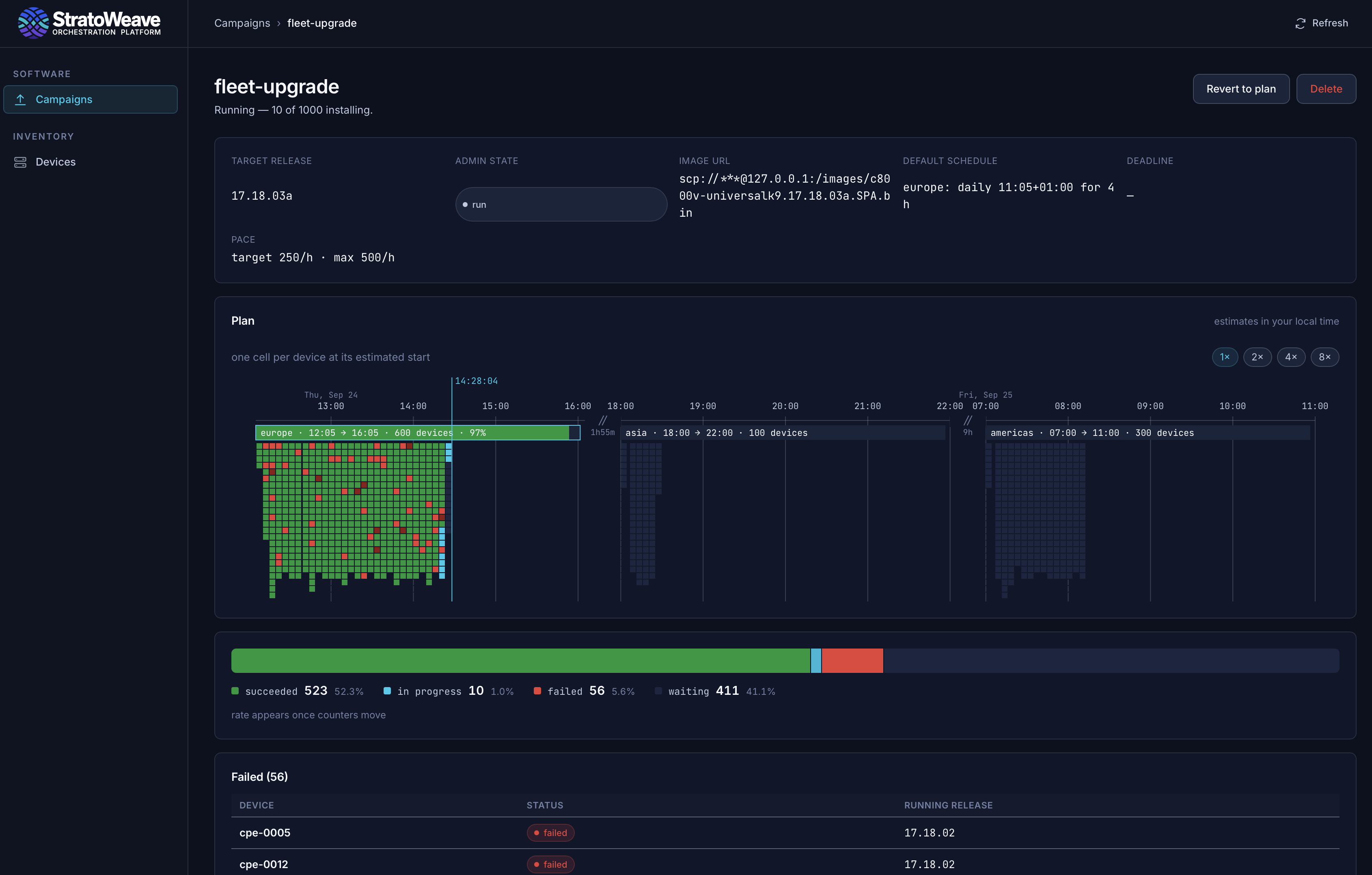
Your orchestration platform can do more than service provisioning. It can also manage the software lifecycle of your devices, from inventory to upgrade campaigns. StratoWeave's Fleet Manager demonstrates how to coordinate device upgrades across a fleet with different maintenance schedules, while providing operators with a shared view of the work ahead and the results as it runs.
Plan upgrades according to maintenance schedules
Assign a predefined maintenance schedule to each device in your fleet. For each upgrade campaign, select a set of devices and a target release, and let the system take care of the rest. The Fleet Manager will automatically plan the upgrade campaign, scheduling upgrades for each device according to its maintenance window. The system is aware of timezones and maintenance window notice periods.
As soon as you add a device for StratoWeave management, the system will automatically collect inventory information such as the current software version, hardware model, and other relevant metadata. This information is used to determine which devices are eligible for a given upgrade campaign, and to select the exact software image in an operating system family.
Preparation steps outside of maintenance windows
StratoWeave can execute non-disruptive preparation steps outside of maintenance windows, this includes downloading and caching the target release, performing some pre-upgrade checks, and cleaning up old upgrade artifacts.
Service-aware upgrade jobs
Once inside the maintenance window, StratoWeave's Fleet Manager will release individual devices to commence the upgrade process. The system will start slow and ramp up the upgrade pace to the maximum allowed by the campaign settings. Devices that are part of a redundancy group or are otherwise related, will be upgraded one at a time, so that the service remains available throughout the campaign. An upgrade will not start if the redundancy group is already in a degraded state.
For each device, the upgrade component will (re-)evaluate the device's current state, e.g. software image checksum, available disk space and most crucially, the state of the services running on the device.
The platform comes with set of pre- and post-upgrade checks that will be executed before and after the upgrade job. By keeping a snapshot of e.g. interface state, BGP sessions, and received routes, the system can verify that the new software version is running correctly and that the upgrade did not cause any service disruption.
We do encourage you to define your own pre- and post-upgrade checks, so that you can verify that your specific services are running correctly before and after the upgrade.
Failed upgrades and rollbacks
If an upgrade fails, the system will automatically attempt to roll back the device to the previous software version. The rollback process is also service-aware, and will automatically be executed if the device's services are unhealthy after the upgrade. If the rollback fails, the system will notify the operator and provide a set of tools to help recover the device.
A failure budget can be defined for each upgrade campaign, which will determine how many devices can fail before the campaign is stopped. If the failure budget is exceeded, the campaign will be paused and the operator will be notified. The operator can then decide to either fix the issue and resume the campaign, or to stop the campaign entirely.